The question "is voice faster than typing?" sounds like it should have an obvious answer. Yet most people have never measured it for themselves, and many of the figures quoted online come without a source.
This article sticks to published research, says clearly where the evidence stops, and shows you how to measure your own numbers in a few minutes.
The Short Answer#
| Input method | Typical speed | Source |
|---|---|---|
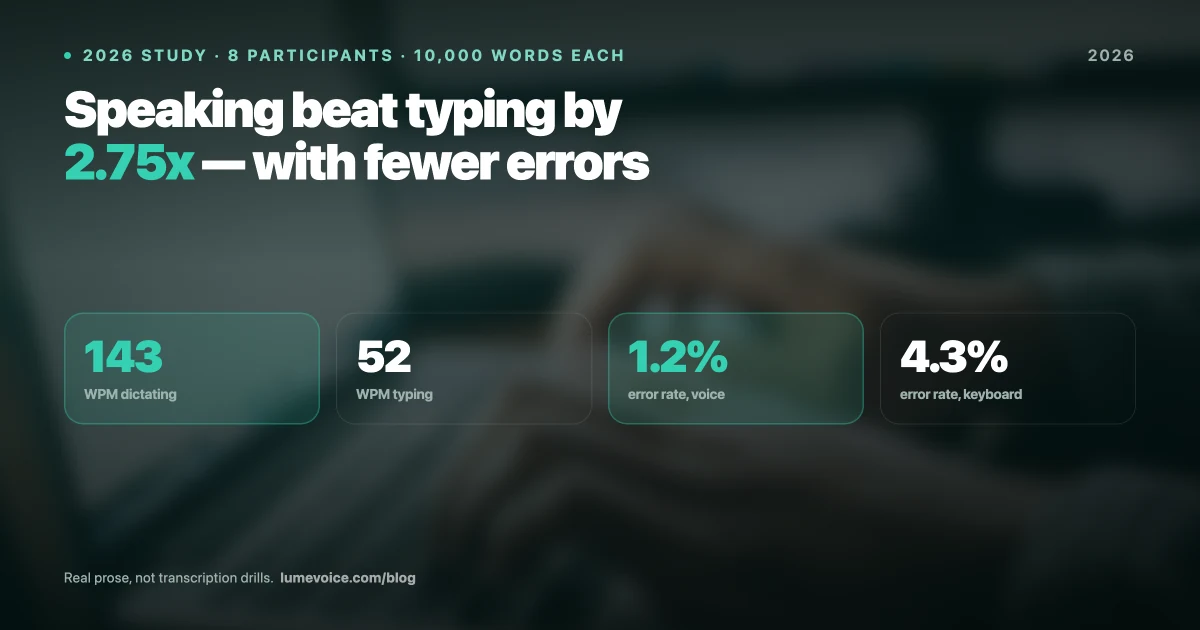
| Conversational speech | About 120–150 words a minute | Commonly cited range; no single source |
| Typing on a computer (average) | About 52 words a minute | Aalto University analysis of 136 million keystrokes (Dhakal et al., CHI 2018) |
| Speech vs typing on a phone | Speech about 3× faster, with fewer errors | Stanford, University of Washington and Baidu (Ruan et al., 2016) |
Swipe to see all columns
On those figures, speaking gets words down more than twice as fast as average typing. But raw input speed isn't the whole story: you also think, check and fix. The rest of this article explains how those steps change the picture, and when the keyboard still wins.
What the Research Says#
Speech vs typing on a phone#
In 2016, researchers from Stanford University, the University of Washington and Baidu compared speech recognition with typing on a smartphone's touchscreen keyboard, in English and in Mandarin. Speech input was about three times faster, and the resulting text had fewer errors.
Two caveats. The comparison was with typing on a phone, not on a full-size keyboard, where people type faster. And it used the speech recognition of 2016, which has improved since. It's strong evidence that speaking beats phone typing, and a reasonable hint about computers, not proof.
How fast people type on a computer#
A team at Aalto University analysed 136 million keystrokes from an online typing test (Dhakal et al., CHI 2018) and found an average speed of about 52 words a minute, with large differences from one person to the next.
That test measured copying sentences. When you compose your own text, you stop to think, so your real writing speed is likely to be lower than your typing-test score.
How fast people speak#
Conversational English is commonly put at about 120–150 words a minute. There's no single definitive source, and the rate varies with the person, the language and the situation. Dictating is slower than chatting for the same reason composing is slower than copy-typing: you're deciding what to say.
Why Raw Speed Isn't the Whole Story#
Words per minute measures how fast text goes in. What you care about is how long it takes to get a finished message out. Three things sit in between.
Thinking time#
Neither method makes you think faster. If you know what you want to say, speaking gets it down quicker. If you're working it out as you go, both methods slow down to the speed of your thinking. Many people find speaking reduces the stop-start of typing, because you say a whole sentence instead of building it a few words at a time.
Fixing mistakes#
Typing errors are mostly typos you catch as you go. Dictation errors are different: a misheard name, a word that sounds like another, or a term the model has never seen. A custom vocabulary fixes the recurring ones; you catch the rest when you read back. Either way, count the fixing time when you compare.
Filler words and false starts#
Speech is messy. People say "um", restart sentences and correct themselves mid-thought. A plain transcriber writes all of that down, and you delete it by hand. Dictation apps with an AI cleanup step, such as LumeVoice, remove filler words, apply self-corrections ("seven, actually no, nine" becomes "nine") and turn spoken lists into numbered lists, so there's less to edit.
Physical Strain#
Dictation means far fewer keystrokes, which is why it's widely used by people with repetitive strain injuries and other conditions that make typing painful. If typing hurts, dictation is worth trying, alongside advice from a doctor or physiotherapist.
It isn't strain-free, though. Talking for hours tires your voice. Mix the two: dictate long passages, type short edits, take breaks and keep water nearby.
How to Measure Your Own Speed#
You don't need a study. You need a timer and two emails' worth of writing.
- Check your typing speed. A free test such as Monkeytype, Keybr or TypingClub gives you a copy-typing baseline.
- Type a real message. Pick something you'd actually write, about 150–200 words. Time it from the first word to ready-to-send, including fixes.
- Dictate a similar message. Same length, same kind of content. Time it the same way, including reading it back and fixing it.
- Divide words by minutes for each. That's your real writing speed with each method.
- Repeat after a week. Dictation takes some getting used to, so treat your first attempt as a floor, not your real speed.
| Typing | Dictation | |
|---|---|---|
| Typing-test speed (copying) | n/a | |
| Words in your message | ||
| Minutes to ready-to-send | ||
| Real writing speed (words ÷ minutes) |
Swipe to see all columns
The Learning Curve#
There's no trustworthy figure for how long dictation takes to learn, so here's what tends to trip people up in the first week, and what helps.
- Thinking out loud feels odd. Start with things you'd happily say out loud anyway: replies, quick updates, notes to yourself.
- Long pauses. Pause between thoughts, not in the middle of a sentence. If you need time to think, stop, think, then start again.
- Correcting yourself. With an app that applies self-corrections, just say the right version ("Thursday, no, Friday") instead of stopping to edit.
- Names and jargon. Add them to your custom vocabulary the first time one comes out wrong.
- Long dictation. For anything over a few sentences, use hands-free mode if your app has one (in LumeVoice, double-press the dictation key), so you don't have to hold a key down.
When Keyboard Typing Still Wins#
| Scenario | Why the keyboard wins |
|---|---|
| Open office or a meeting | Talking disturbs people, and you may not want to be overheard |
| Passwords and sensitive details | You shouldn't say them out loud |
| Complex code, regex and special syntax | Symbols and brackets are clumsy to speak |
| A word or two | Reaching for the keyboard is quicker |
| Chatting during a call | You can't talk on the call and dictate at the same time |
| No internet, with a cloud app | Cloud dictation needs a connection |
Swipe to see all columns
These are real constraints. Dictation isn't a replacement for the keyboard; it's a faster way to write the longer stretches of prose: emails, messages, documents and notes.
What It Adds Up To#
You can estimate your own potential saving with simple arithmetic, using your numbers from the test above:
Minutes saved per day ≈ (words you write per day ÷ your typing speed) − (words you write per day ÷ your dictation speed)
Use your real writing speeds, the ones that include thinking and fixing, not your typing-test score. If the result is small, dictation may not be worth changing your habits for. If it's large, it compounds: the same saving, every working day.
Run This Experiment Yourself
Create a LumeVoice account and get 3,000 free words, no card required. That's enough for the test above several times over.
- Measure your own speed in your first session, with the method above
- Types into whatever app has your cursor: Slack, Gmail, VS Code, Notion, Word, on Mac, Windows, iPhone and Android
- Plans: $14.99/mo, $79.99/yr, or $249 lifetime, with a 7-day free trial when you first upgrade in the app (card required)