
Dictation on a Mac stopped being a novelty a while ago. What still varies is accuracy, and accuracy decides whether voice typing saves you time or quietly costs you more than it saves.
If you have to fix one word in ten, you are not writing faster. You are just typing with extra steps.
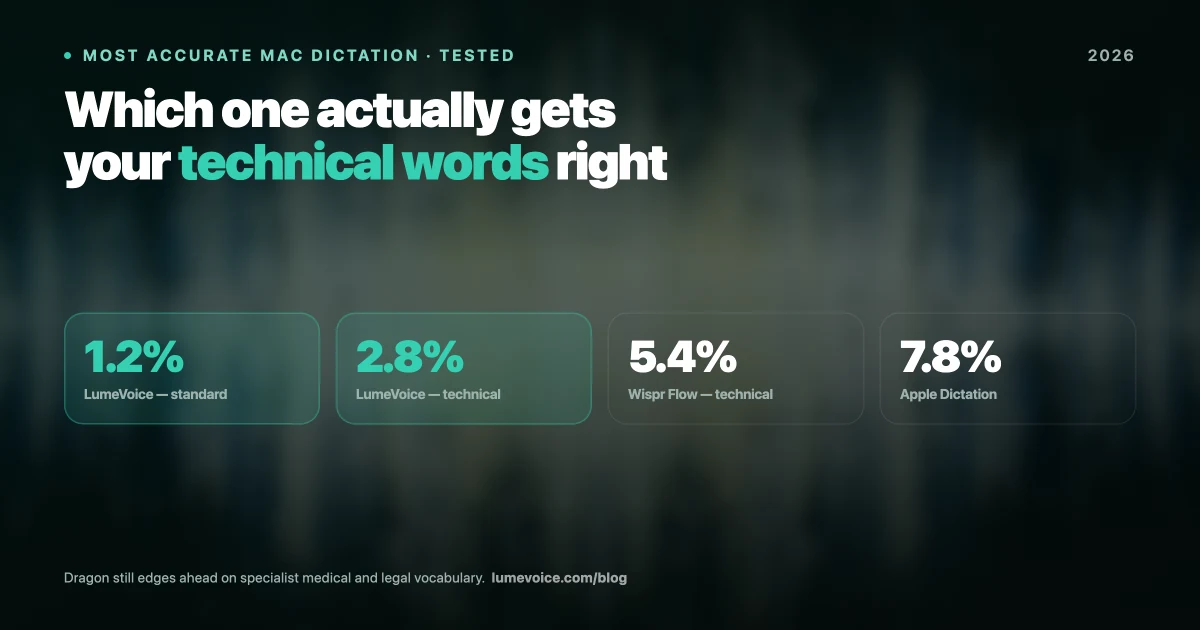
So which is the most accurate dictation app for Mac in 2026? The honest answer: the one that makes the fewest mistakes on your voice, your vocabulary and your microphone. Published error rates are measured on different recordings and can't be compared across apps, so this guide doesn't rank apps by them. Instead, it compares the six main options on the things that decide accuracy, and shows you how to check them yourself.
What "Accurate" Actually Means#
Most accuracy claims trace back to public test sets. One of the best known, LibriSpeech, is made of audiobook narration: clean recordings of people reading aloud in quiet rooms.
Your Tuesday afternoon does not sound like that.
The standard metric is word error rate: the share of words the engine gets wrong, counting substituted, missing and extra words. Lower is better. But the same engine can score very differently on clean narration and on real speech recorded on a laptop, so a headline figure tells you little about your own results.
Four things drive that gap:
- Your microphone. A built-in MacBook mic sits behind a keyboard in a room with hard surfaces. It picks up echo, fan noise and keystrokes.
- Vocabulary the model has never seen. Product names,
kubectl, your colleague Siobhán, your company's internal acronyms. - Your accent. Speech that's less common in a model's training data is recognised less reliably. OpenAI's Whisper paper shows the same pattern across languages.
- How people actually talk. Nobody speaks in clean sentences. You start over, you say "um", you correct yourself mid-thought.
That last one matters most for dictation, and we'll come back to it, because it's where raw error rates stop being a useful score.
How the Six Apps Compare on Accuracy#
Rather than quote error rates nobody can reproduce, here's what each app documents about the things that drive accuracy: the speech model, where it runs, whether you can teach it your vocabulary, and whether it cleans up the way people talk.
| App | Speech model | Where it runs | Custom vocabulary | Cleanup | Price |
|---|---|---|---|---|---|
| LumeVoice | Whisper large-v3-turbo (via Groq); Mistral Voxtral as fallback | Cloud | ✅ Custom dictionary | ✅ Filler words, self-corrections, spoken lists, grammar | 3,000 free words, then $14.99/mo, $79.99/yr, or $249 lifetime |
| Wispr Flow | Not named | Cloud only | ✅ Personal dictionary | ✅ Filler words, self-corrections | Free plan (2,000 words a week on Mac); Pro $15/mo or $144/yr |
| Superwhisper | Local or cloud models, your choice | Your Mac (offline) or cloud | ✅ Vocabulary list | Optional, through AI modes | Free tier with limits; Pro $8.49/mo, $84.99/yr or $249.99 lifetime |
| MacWhisper | Whisper models you choose (some only fully available in Pro) | Your Mac (offline) | Not listed | Removes filler words; Pro adds grammar fixes via an AI service you connect | Free version; Pro €65 one-time (Gumroad) |
| Otter.ai | Not named | Cloud | ✅ Limits vary by plan | Meeting transcripts and notes, not dictation cleanup | Basic free (300 min a month); Pro $16.99/mo, or $8.33/mo billed annually |
| Apple Dictation | Apple's own | Some languages on the device (see Keyboard settings) | ❌ | ❌ | Free, built in |
Swipe to see all columns
Prices as of October 2026; vendors change them, so check their sites.
Two things stand out.
First: the built-in option is free and private, but leaves the fixing to you. Apple Dictation costs nothing and can process speech on your Mac: Keyboard settings show which languages it handles on the device. It has no custom vocabulary and no AI cleanup, though, so names, jargon, filler words and false starts land on the page as spoken. It's fine for a quick iMessage; for a work email, expect to edit.
Second: the paid apps are more alike than the marketing suggests. LumeVoice and MacWhisper both run Whisper models, and Superwhisper lets you choose among local and cloud models. The real differences are elsewhere: whether you can teach the app your vocabulary, whether it cleans up the way people actually talk, whether it runs on your Mac or in the cloud, and whether it's built for live dictation (LumeVoice, Wispr Flow, Superwhisper), audio files (MacWhisper) or meetings (Otter).
LumeVoice transcribes with Whisper large-v3-turbo, cleans up filler words and self-corrections, and types the result into whatever app you're in. New accounts get 3,000 free words, no card required. Try it free →
Why the Lowest Error Rate Isn't Always the Best Writing#
Here's the thing benchmark tables hide.
Word error rate rewards a tool for transcribing exactly what you said. But you don't want exactly what you said. Read a perfect transcript of yourself talking sometime: it's full of "um", "you know", sentences that die halfway, and corrections like "send it Tuesday, no wait, Wednesday."
A tool that faithfully reproduces all of that scores well and still leaves you editing. A tool that understands you meant Wednesday and writes only that has technically "erred", and saved you the edit.
This is the real dividing line in 2026, and it's why LumeVoice runs a cleanup pass after transcription:
- Filler words removed: "um", "uh", "you know", and "like" when it's only a pause.
- Self-corrections applied: say "Tuesday, no, Wednesday" and only Wednesday appears.
- Spoken lists turned into numbered lists, and spoken punctuation commands converted when you use them.
- Grammar and spelling fixed.
- Custom dictionary, so
kubectl, your product names and your colleagues' names are spelled the way you want. - Writing styles, so a work message can read differently from an email.
LumeVoice isn't alone here: Wispr Flow also removes filler words and handles self-corrections, and Superwhisper can run AI modes over the transcript.
Researchers at Stanford, the University of Washington and Baidu found speech input about three times faster than typing on a smartphone keyboard, with fewer errors. That study measured raw input, not finished writing. Fixing the transcript is where much of the real-world time goes, and it's the step most accuracy comparisons leave out.
How to Get Better Accuracy From Any Mac Dictation Tool#
Whichever tool you land on, these move the needle more than most people expect:
Use a decent microphone. A microphone close to your mouth, such as a headset or a USB mic, picks up more of you and less of the room than your MacBook's built-in mic. In a noisy room, this can make more difference than switching apps.
Load your custom vocabulary before you need it. Add product names, technical terms and the names of people you write about often. LumeVoice, Wispr Flow, Superwhisper and Otter support this; Apple Dictation doesn't. If you write code, it's often the setting that helps most; see our guide to voice coding in VS Code and Cursor.
Speak at a normal pace, in full thoughts. Modern models use the surrounding words to work out unclear ones, so slow, over-enunciated dictation with long pauses often works worse than natural speech.
You rarely need to say punctuation. Modern engines add most punctuation themselves. Many apps, LumeVoice included, still understand spoken commands such as "comma" or "question mark" when you want a specific mark.
Check the model, not just the app. Some Mac apps let you choose the model. If yours does, try a larger or newer one on your hardest passage and compare.
Test before you commit. Read the same three passages (everyday text, your jargon, names and numbers) into each app and count the fixes. Our guide to AI dictation accuracy walks through a simple method.
We go deeper on this in our guide to fixing poor dictation accuracy on Mac.
What About Privacy?#
Accuracy and privacy often pull against each other: large models are easiest to run in the cloud, and the cloud means your voice leaves your Mac.
Here's where each app stands. MacWhisper transcribes on your Mac, and Superwhisper can run fully offline with local models. Apple Dictation can process speech on your Mac: Keyboard settings show which languages it handles on the device. LumeVoice, Wispr Flow and Otter process speech in the cloud.
LumeVoice is cloud-based and has no offline mode. Your audio is sent for transcription and isn't stored after processing, your transcription history stays on your device, and nothing you say is used to train a model. If your work can't leave your Mac at all, choose a local tool. If you work under HIPAA or GDPR constraints, our privacy-focused dictation guide covers what to check before you commit to any tool.
Conclusion#
The most accurate dictation app for Mac in 2026 isn't the one with the best headline number; it's the one that gets closest to publishable text on the first pass, for your voice.
- Live dictation into any app, with cleanup: LumeVoice or Wispr Flow (both cloud-based).
- Everything must stay on your Mac: Superwhisper with local models, or MacWhisper for recorded audio.
- Meetings: Otter, a meeting transcription and notes tool rather than a dictation keyboard.
- Quick messages, no budget: Apple Dictation.
If you're currently fighting Apple Dictation, an app with a custom vocabulary and AI cleanup is worth trying. If you're choosing between paid tools, ignore headline accuracy claims and test each one on your own vocabulary, in your own accent, in your actual room. That's the only benchmark that matters.
Start Writing at the Speed of Speech#
The best accuracy is the kind you stop noticing: the text lands right the first time and you keep going.
LumeVoice turns your speech into clean, formatted text in any app on your Mac, Windows PC, iPhone or Android phone, with filler words removed and self-corrections resolved. Free to start, no card needed. Every new account gets 3,000 free words, no card required, and Pro Monthly and Annual start with a 7-day free trial when you first upgrade in the app (card required).
Related Guides#
- AI dictation accuracy: what affects it and how to compare apps
- Best AI dictation apps for Mac
- How to fix poor dictation accuracy on Mac
- Best Dictation Apps for Accented English in 2026 (and How to Get Better Results)
- Best Dictation Software in 2026: Mac and Windows Picks by Use Case
- Best Microphone for Dictation: Headset, USB, Lavalier or Built-In?
- Custom Vocabulary in Dictation: How Dragon, Apple, Wispr Flow and Others Handle It


