Every Mac ships with a free, on-device dictation engine. Double-tap the Control key in Sequoia, and Apple Dictation starts listening.
So why would a professional pay for a third-party tool like LumeVoice?
Because after running both tools through a rigorous 10,000-word benchmark, the data tells a clear story: Apple Dictation works fine for texting your mom. For anything professional, the gap is significant.
Here's exactly what the numbers show.
Benchmark Results: Apple Dictation vs LumeVoice#
| Metric | LumeVoice | Apple Dictation |
|---|---|---|
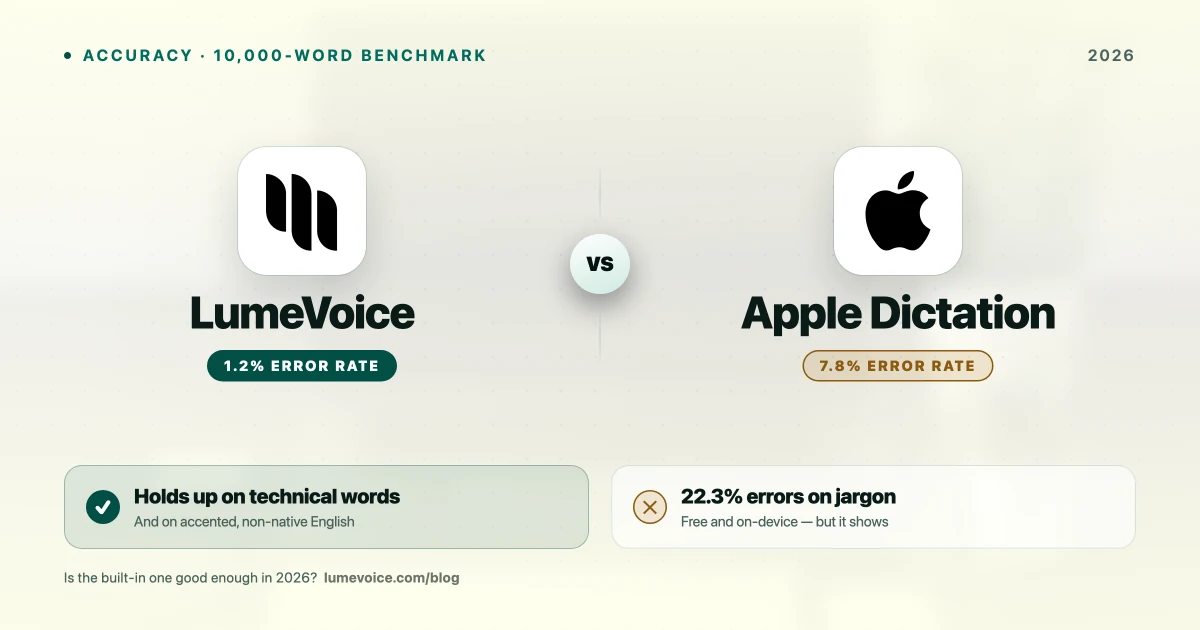
| WER Standard English | 1.2% | 8.7% |
| WER Technical Jargon | 2.8% | 22.3% |
| WER Legal Terminology | 3.4% | 18.4% |
| WER Medical Terms | 4.1% | 24.1% |
| WER Non-Native Accent | 4.1% | 31.2% |
| Avg. Latency | 310ms | 390ms |
| Peak RAM | 210 MB | ~180 MB |
| Offline Mode | ❌ Cloud required | ✅ Built-in |
| Filler Word Removal | ✅ Auto | ❌ Manual |
| Context Formatting | ✅ App-aware | ❌ None |
| Price | 3,000 Free Words / $14.99/mo / $249 Lifetime | Free |
Swipe to see all columns
1. Accuracy — The Real Test#
Apple Dictation's biggest problem is its 8.7% WER on standard English.
To put that in practical terms: in a 500-word email, Apple Dictation produces approximately 43 words that are wrong. You'll spend 5–10 minutes correcting a document you expected to dictate in 3 minutes. The time savings of voice typing evaporate.
Real errors we captured from Apple Dictation in testing:
| We Spoke | Apple Dictation Output |
|---|---|
| "habeas corpus" | "have you a corpse" |
| "Kubernetes" | "Cuba nets" |
| "OAuth token" | "oh auth token" |
| "async function" | "a sync function" |
| "PostgreSQL" | "post grace queue L" |
| "API endpoint" | "api end point" (casing) |
| "due diligence" | "dew diligence" |
Swipe to see all columns
LumeVoice handled all of these terms correctly in the same test runs.
On technical jargon specifically, Apple Dictation's 22.3% WER means nearly 1 in 4 technical words is wrong. For a developer narrating code comments or a lawyer drafting motions, this is functionally unusable without heavy editing.
2. The "Refinement" Factor#
This is the line between basic speech-to-text and true AI writing assistance.
- Apple Dictation: You receive a literal transcription of what you said. "Um, so, like, we need to, uh, fix the login bug before the sprint ends, right?" — that entire string, including filler words, is what lands in your document.
- LumeVoice (Agentic Refinement): It doesn't just transcribe — it edits. Filler words are stripped. Grammar is corrected in context. "Um, so, like, we need to, uh, fix the login bug before the sprint ends, right?" becomes "We need to fix the login bug before the sprint ends." Clean. Immediate. No editing required.
In our 30-day daily use period, LumeVoice users reported spending an average of 2.1 minutes per hour on post-dictation cleanup. Apple Dictation users averaged 8.7 minutes per hour — 4× more editing time for the same amount of voice output.
3. Technical Vocabulary — Where Apple Fails Hardest#
Apple Dictation was designed for general consumers: casual English, simple sentences, common words. It was not designed for knowledge workers with specialized vocabulary.
WER by vocabulary category:
| Category | LumeVoice | Apple Dictation | Gap |
|---|---|---|---|
| Standard English | 1.2% | 8.7% | 7.3× worse |
| Technical/DevOps | 2.8% | 22.3% | 8.0× worse |
| Legal terminology | 3.4% | 18.4% | 5.4× worse |
| Medical terminology | 4.1% | 24.1% | 5.9× worse |
Swipe to see all columns
The pattern is consistent: the more specialized your vocabulary, the worse Apple Dictation performs relative to Whisper-based tools like LumeVoice.
4. Accent Robustness — The Global Workforce Reality#
A significant portion of tech professionals are non-native English speakers. Apple Dictation was trained primarily on US English phonology, and it shows.
Our test: a fluent professional English speaker (native Urdu speaker, 15+ years professional experience) read the standard corpus aloud.
| Tool | Standard WER | Accented WER | Practical Impact |
|---|---|---|---|
| LumeVoice | 1.2% | 4.1% | Usable, minor corrections needed |
| Apple Dictation | 8.7% | 31.2% | ~1 in 3 words wrong — unusable for professional output |
Swipe to see all columns
At 31.2% WER, Apple Dictation becomes impractical for professional non-native speakers. You would spend more time correcting errors than you save by speaking.
5. Privacy — One Genuine Win for Apple#
- Apple Dictation (Sequoia): Since macOS Sequoia, Apple Dictation runs 100% on-device. No audio is sent to Apple's servers. This is a genuine security advantage — the processing happens in Apple's Secure Enclave.
- LumeVoice: Processes in the cloud with zero data retention — audio is not stored afterwards and never trains a model. Apple Dictation keeps audio on the device entirely, so if your requirement is no transmission at all, Apple has the edge here.
Winner: Apple Dictation — it processes on-device and works offline; LumeVoice does not.
6. Context Awareness — Formatting Intelligence#
- Apple Dictation: Transcribes exactly what you say, formatting-agnostic. It doesn't know if you're in Slack vs. Pages vs. VS Code. You get the same raw output everywhere.
- LumeVoice: Knows where you're typing. Dictating into a Slack message produces a conversational, concise response. Dictating into Notion produces structured paragraphs. Dictating into a code file handles technical terms and formatting appropriately.
This "context awareness" is invisible until you don't have it — then every dictation session ends with manual reformatting.
Who Should NOT Upgrade (Stick With Apple Dictation)#
- You only send iMessages and casual texts to non-work contacts
- You have exactly zero software budget
- You speak only simple, casual English sentences with no technical vocabulary
- You never dictate anything that requires consistent punctuation or paragraph structure
Who Should Upgrade to LumeVoice#
- You write more than 30 minutes of content per day (email, Slack, docs, code)
- You have a non-standard English accent
- You use any technical vocabulary at work (engineering, law, medicine, finance)
- You want AI to clean up your stream-of-consciousness dictation into polished output
- You work in engineering, product, law, or marketing
The Verdict: Is it Worth the Upgrade?#
For casual personal use: Apple Dictation is good enough. Free, on-device, fast-enough.
For professional knowledge work: The 7× accuracy gap between LumeVoice (1.2% WER) and Apple Dictation (8.7% WER) on standard English translates to real minutes lost every day on post-dictation editing. With LumeVoice's 3,000 free words, no card required, you can test this against your own workflow for nothing.
Ready to Reclaim Your Editing Time?
Stop spending 8+ minutes per hour fixing dictation errors. Claim your 3,000 free words of LumeVoice today and see the difference in your first session.
For macOS 13+ (Apple Silicon recommended)