Who This List Is NOT For#
Before we start — this guide is not for everyone. Skip it if:
- You need to type silently in meetings, libraries, or shared open offices
- You're a competitive typist trying to hit 200+ WPM on keyboard speed tests
- You primarily work on an iPad or iPhone (different tools, different guides)
- You need typing for gaming (keyboard reflexes, not output speed)
If you're a knowledge worker — a developer, founder, writer, lawyer, researcher — who wants to produce more written output per hour with less physical strain, this guide is exactly for you.
How We Chose These Tools#
The list covers three kinds of tools that help a MacBook user write more:
- Typing trainers that build keyboard speed and accuracy (TypingClub, Monkeytype, Keybr)
- Voice tools that replace typing for prose or transcribe recordings (LumeVoice, Wispr Flow, MacWhisper)
- Writing utilities that cut repetitive typing or editing time (TextExpander, Grammarly, Typora)
What we compared:
- What the tool improves: keyboard technique, words produced per hour, or time spent on repeated text
- Where it works: in a browser, in one app, or system-wide
- Cost: free, subscription or one-time
- Who it suits: students, writers, developers, support teams
Sources: each tool's documented features and published prices, checked in October 2026, plus the published research cited below
Tasks in mind: emails, Slack messages, technical documentation, code comments
We make LumeVoice, which is on this list, so weigh our pick accordingly.
Voice vs. Keyboard: What the Research Says#
Before the list, here's what published research says about the two main ways of getting words onto a screen:
| Input method | Typical speed | Source |
|---|---|---|
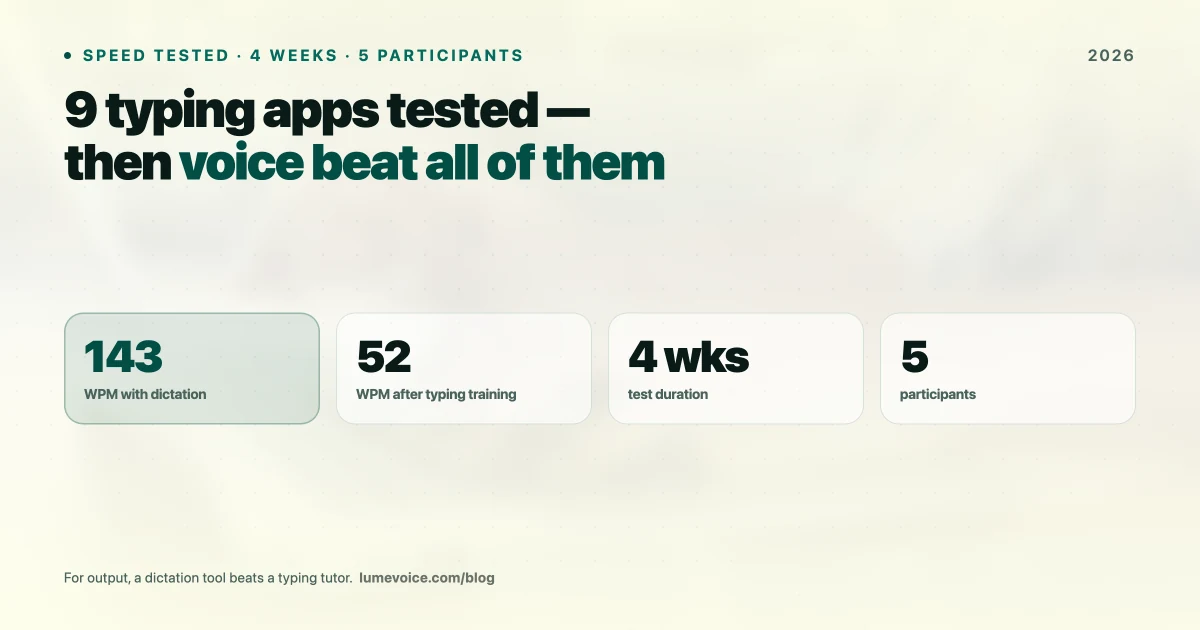
| Typing on a computer keyboard | About 52 words a minute on average | Aalto University analysis of 136 million keystrokes (Dhakal et al., CHI 2018) |
| Conversational speech (English) | About 120–150 words a minute | Commonly cited range |
| Speech vs. a smartphone keyboard | About 3× faster, with fewer errors | Stanford, University of Washington and Baidu (Ruan et al., 2016) |
Swipe to see all columns
Two caveats. Speaking speed isn't writing speed: you pause to think, and dictated text needs some editing. And the Stanford study compared speech with a phone keyboard, not a MacBook keyboard. Still, the gap is wide.
What this means: If you type at about the average speed, you probably speak two to three times faster than you type. A fast touch typist gains less from dictation, but still saves their hands for the work that genuinely needs a keyboard.
The Top 9 Typing Apps for MacBook in 2026#
| App | Type | Price | Best for |
|---|---|---|---|
| LumeVoice | Voice dictation | 3,000 free words, then $14.99/mo | Writing without typing |
| TypingClub | Typing course | Free for individuals | Learning to touch type |
| MacWhisper | File transcription | Free / €65 one-time (Gumroad) | Transcribing recordings |
| Monkeytype | Typing test | Free (open source) | Measuring and practising speed |
| TextExpander | Text expansion | Free plan; paid from $5/mo billed annually | Repetitive text |
| Grammarly | Writing assistant | Free plan; Pro $12/mo billed annually | Editing |
| Keybr | Typing trainer | Free | Fixing weak keys |
| Wispr Flow | Voice dictation | Free plan; $15/mo or $144/yr | Cloud dictation on every device |
| Typora | Markdown editor | $14.99 one-time | Distraction-free writing |
Swipe to see all columns
Prices as of October 2026; vendors change them, so check their sites.
1. LumeVoice — Best for Writing Without the Keyboard#
LumeVoice doesn't make you type faster; it replaces typing with talking for most of what you write. Hold fn, speak, and the finished text appears in whatever app has your cursor: Slack, Notion, Mail, VS Code.
What makes it different from built-in dictation: a language model cleans the text up before it's typed. It removes filler words, applies self-corrections ("seven, actually no, nine" becomes "nine"), turns spoken lists into numbered lists and fixes grammar. On top of that you get a custom dictionary for names and technical terms, snippets for text you repeat, writing styles for messaging, email and other apps, a hands-free mode (double-press the key) for long passages, and 100 languages.
Tradeoffs: It's cloud-based, with no offline mode, so it needs a connection. Audio isn't stored after processing, your transcription history stays on your Mac, and nothing you say trains a model.
Pricing: 3,000 free words, no card required, then $14.99/month, $79.99/year or $249 lifetime. Monthly and Annual start with a 7-day free trial when you first upgrade in the app (card required). Students get 50% off.
Best for: Developers, writers, founders, marketers — anyone who produces written output as a core job function.
2. TypingClub — For Building Keyboard Fundamentals#
If you refuse to use your voice or need silent keyboard skills, TypingClub is one of the best structured typing courses available. It uses a proper teaching approach: home row positioning, finger assignments, graduated difficulty.
How to get the most from it: short, regular sessions beat occasional marathons. Follow the lessons in order and resist looking at the keys: accuracy first, speed second.
Best for: Students building fundamentals, people whose jobs require silent typing, anyone under 50 WPM who wants to close the gap
Who should NOT use TypingClub: Confident touch typists who want more output. Past a certain point, extra drills bring small gains; for more words per hour, voice is the bigger lever.
Pricing: Free for individuals (runs in the browser, no download required)
3. MacWhisper — The Local Transcription Tool#
MacWhisper is excellent for transcribing pre-recorded audio — interviews, podcasts, meeting recordings — locally and offline on your Mac. Its live dictation is secondary to file transcription, so it isn't the tool to replace your keyboard.
Best for: Journalists, researchers, and podcasters who need to transcribe audio files
Not for: Live keyboard replacement
Pricing: Free version (single files; some models are only fully available in Pro) | Pro €65 one-time (Gumroad)
4. Monkeytype — For Measuring and Training Keyboard Speed#
Monkeytype is a beautifully designed, minimalist typing speed test. If you want to measure your current WPM, see where your mistakes come from, and gamify the improvement process, Monkeytype is a great tool for it.
Standout feature: Custom text — you can practise on vocabulary from your own field (programming keywords, legal terms) to see where your finger memory actually breaks down.
Best for: Competitive typists, people who want to gamify improvement, anyone curious about their actual WPM
Not for: Increasing total daily output (it trains speed, not workflow)
Pricing: Free and open source
5. TextExpander — The Automation King#
TextExpander is one of the most underrated productivity tools on this list. It doesn't increase your WPM directly — instead, it eliminates the need to type certain things at all.
Example uses:
- Typing
;meetexpands to a full meeting invite template - Typing
;emailexpands to your email signature block - Typing
;prexpands to a standard pull request template - Typing
;faqexpands to your standard answer to a common support question
How much time it saves depends on how much of your day is repeated text; support, sales and operations roles tend to benefit most.
Overlap with dictation: LumeVoice has its own snippets, triggered by a phrase you say; TextExpander is the better fit if you mostly type.
Best for: Operations, customer success, sales reps, and anyone who types the same text repeatedly
Pricing: Free plan; paid plans from $5/month billed annually ($60/year)
6. Grammarly Desktop#
Grammarly doesn't increase your output speed — it reduces your editing time after the fact. When you're dictating or typing at speed, Grammarly catches collateral damage: grammar errors, word choice issues, clarity problems.
How it fits with dictation: speak the draft, then let Grammarly flag what to tighten. If your dictation app already fixes grammar (LumeVoice does), Grammarly becomes a second pass for tone and clarity rather than a necessity.
Best combined with: Any voice dictation tool for a "speak fast, edit smart" workflow
Not for: Anyone who finds AI grammar suggestions distracting or over-zealous
Pricing: Free plan | Pro $12/month billed annually ($144/year), or $30 billed monthly
7. Keybr — Touch Typing Mastery for Specific Problem Keys#
While TypingClub gives you a complete curriculum, Keybr focuses you on your personal weak spots. It analyzes which specific keys you consistently miss and drills those until your muscle memory catches up.
Best for: Typists at 60–80 WPM who have specific finger patterns they know are slowing them down
Not for: Beginners (TypingClub is better structured for starting from scratch)
Pricing: Free
8. Wispr Flow — The Luxury Voice Experience#
Wispr Flow is a highly polished voice dictation app with beautiful UI design and a premium feel. Like LumeVoice, it's cloud-based, cleans up your speech as it types, and runs on Mac, Windows, iPhone and Android.
The main differences are in how you pay. Wispr Flow has a free weekly allowance (2,000 words a week on Mac and Windows), but no lifetime option. LumeVoice gives you 3,000 free words once and offers monthly, annual and lifetime plans.
Best for: People who want a polished cloud dictation app on every device and are happy to subscribe
Not for: Anyone who needs offline dictation or wants to avoid a subscription
Pricing: Free plan; Pro $15/month, or $12/month billed annually ($144/year)
9. Typora — The Writer's Clean Room#
Typora isn't a typing trainer or a dictation tool — it's a distraction-free Markdown editor that makes writing feel effortless. If your problem is psychological (can't focus on writing, get distracted by notifications), Typora creates a serene, full-screen writing environment.
Best for: Novelists, bloggers, and technical writers who need a clean surface to think
Not for: People who need to type quickly into multiple apps — Typora is a dedicated writing environment, not a system-wide overlay
Pricing: $14.99 one-time for up to 3 devices, with a 15-day trial
When the Keyboard Still Wins#
Voice isn't the answer to everything. The keyboard is still the better tool when you need:
- Silence: open offices, libraries, shared rooms and meetings
- Dense syntax: code with unusual symbols, regular expressions, spreadsheet formulas
- Precise edits: changing one character, fixing a typo, moving the cursor around
- Privacy: passwords and anything you wouldn't say out loud
For everything else — email, Slack, documents, meeting notes, code comments — talking is faster for most people, and easier on your hands and wrists.
Ready to Write Without the Keyboard?
Try LumeVoice and stop letting your fingers be the bottleneck between your thoughts and your output.
- Works in every app — Slack, Notion, VS Code, Gmail, Terminal
- Cleans up as it types — filler words, self-corrections and spoken lists handled
- Your vocabulary — a custom dictionary for names and technical terms
The Bottom Line#
The best typing app in 2026 is the one that removes the most friction between your brain and the written output. For casual typists, TypingClub builds the fundamentals fast. For power users, TextExpander eliminates repetition. For everyone who writes as a core job function, a dictation app like LumeVoice changes the equation most, because it takes the keyboard out of drafting altogether.
Further Reading#
- Best MacWhisper alternatives in 2026
- 9 best Wispr Flow alternatives in 2026
- How accurate is AI dictation in 2026?
- Voice dictation vs. typing: productivity compared
- How to use dictation on Mac
- 9 best AI dictation apps for Mac
- The most accurate dictation app for Mac
- 10 best talk-to-text apps
- LumeVoice vs Apple Dictation
- Arthritis Hand Exercises for Typing: What Experts Recommend
- Google Docs Voice Typing Not Working? 9 Fixes That Actually Help
- How to Prevent Carpal Tunnel From Typing: What Actually Helps
- How to Type After Hand Surgery: One-Handed Setups and Dictation